Love your Shield numbers? Now turn them into action.
Shield is a deep LinkedIn analytics dashboard — a multi-year archive of your posts, audience, and best-time-to-post heatmaps. It's excellent at telling you what already happened. LinkyCoach starts where Shield stops: taking the attention you've measured and turning it into daily engagement. This is an honest comparison — including the reasons you might want to keep Shield.
What Shield actually is
Shield (shieldapp.ai) is one of the most established LinkedIn analytics tools. Connect your profile and it pulls your full post history — not just LinkedIn's roughly 365-day native window — then keeps tracking every post going forward. As of public information in August 2026, its dashboard covers:
- Deep post & profile analytics. Impressions, reactions, comments, reposts, saves, engagement rate, and follower growth over time — with period comparisons and CSV export.
- Audience & content breakdowns. Who engages (job titles, industries, geographies), which formats and topics perform, plus best-time-to-post heatmaps and a weekly email digest.
- An optional AI "Agent" tier. Higher plans add a co-pilot you can ask questions in natural language, get data-backed content recommendations, and generate reports in seconds.
Pricing is tiered by how many profiles you track and whether you want the AI agent. Reported entry prices vary across review sites (roughly single-digit to low-double-digit dollars per month for basic analytics, rising for pro and agent tiers), typically with a free trial and a discount for annual billing — check shieldapp.ai for current numbers. The important point isn't the price; it's the job. Shield is measurement, optimization, and reporting on content you've already published. It doesn't build you a list of people to engage, and it doesn't write your comments.
The gap Shield leaves
Analytics tell you what worked. They don't get the next post commented on. Most people who lean on Shield eventually notice the same thing: the dashboard is beautiful, but the actual engagement work — showing up in the right people's comment sections, consistently, in your own voice — still happens by hand, in the noise of the default LinkedIn feed. That's the gap LinkyCoach fills.
How the two approaches compare
| What you're trying to do | Shield | LinkedIn native analytics | LinkyCoach |
|---|---|---|---|
| Deep historical analytics | Its core strength: full post-history archive, multi-year trends, audience breakdowns, CSV export | Limited — roughly the last 365 days, shallow audience data, no long-run trend | Light timing & voice analysis of your own history — not a deep analytics dashboard |
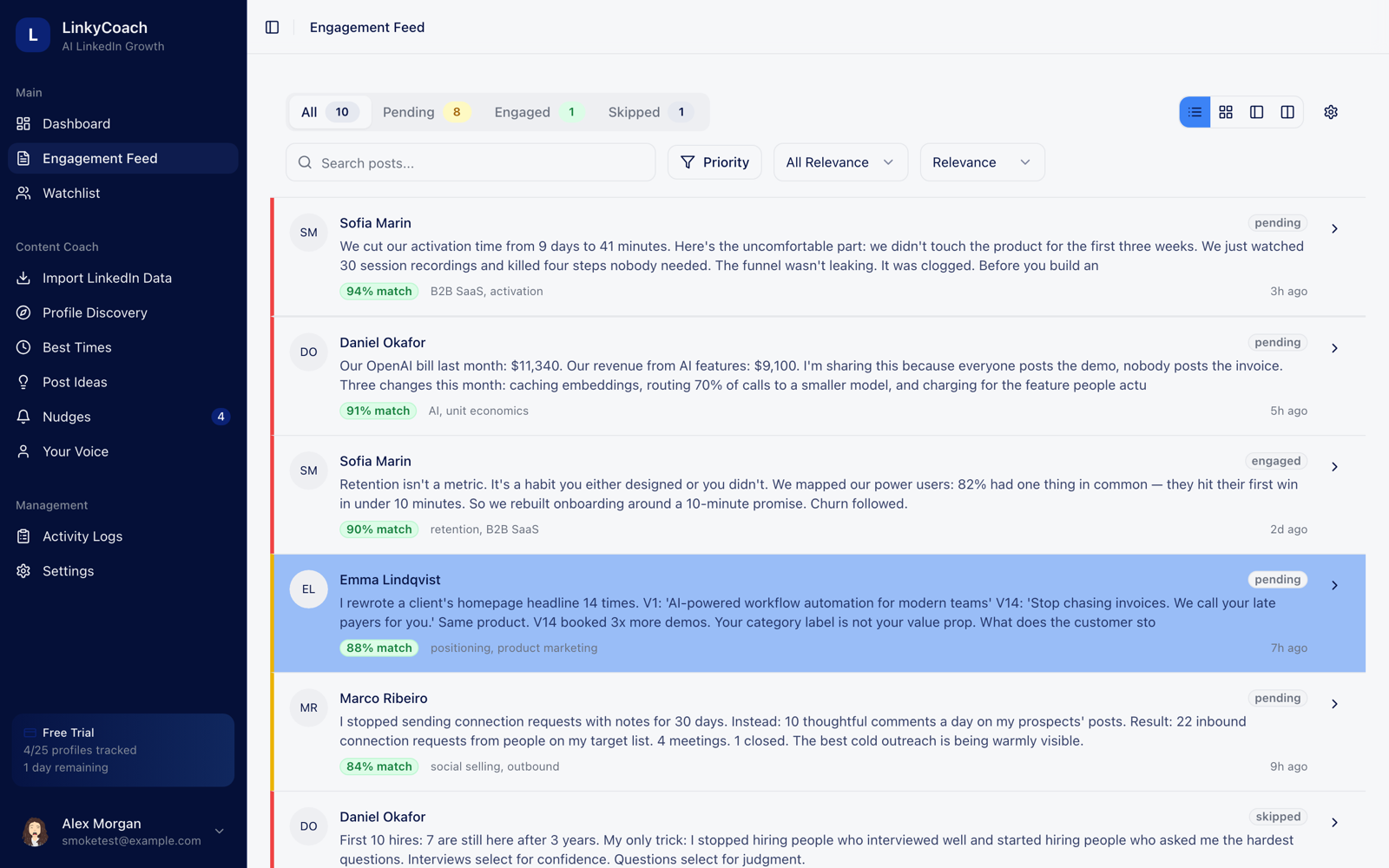
| Watchlist engagement feed | None — Shield measures your content, it doesn't queue other people's posts | None | The core surface: every tracked profile's posts land in one queue, scored 0–100 for relevance to you |
| AI comments in your voice | Agent tier gives content recommendations, not ready-to-post comments | No | Three comment drafts per post (thoughtful, questioning, personal) from a voice profile learned from your real posts |
| Habit & coaching layer | Reports and a weekly digest — insight, not a daily habit loop | None | Nudges, streak milestones (3/7/14/30/60/100 days), and a weekly engagement goal |
| Best-time-to-post | Yes — heatmaps derived from your historical performance | Minimal | Yes — timing suggestions drawn from your own posting history |
| Account safety approach | Read-only analytics; you connect to sync your data | Native, no third party | No LinkedIn password ever, no cookie-based extension, human-in-the-loop — AI drafts, you post |
| Pricing | Tiered by profiles + AI agent; free trial, annual discount (see shieldapp.ai for current numbers) | Free | Free to start — no card, 3 days of full access; then Basic $29/mo, Pro $59/mo or Business $99/mo |
Where LinkyCoach fits
LinkyCoach is engagement-first by design. The loop: track the profiles that matter — prospects, peers, customers — and their new posts land in a feed scored 0–100 for relevance to you. Each post arrives with three comment drafts written from a voice profile learned from your actual posts, so what you say sounds like you, not like a bot. Nudges and streaks keep the habit alive, and timing suggestions come from your own history rather than a generic chart.
Safety is the headline, not a footnote: LinkyCoach never asks for your LinkedIn password, doesn't use a cookie-based extension, and never posts or comments on your behalf. Every AI draft waits for you to review, edit, and post it yourself. It's a single-seat tool that does light timing and voice analysis — deliberately not the deep historical analytics engine Shield is.
Who should NOT pick LinkyCoach
Honesty over conversion. Stay with Shield (or add it alongside) if any of these describe you:
- You want deep, long-run analytics. This is exactly what Shield is built for — multi-year archives, audience demographics, format/topic breakdowns, CSV export. LinkyCoach only does light timing and voice analysis, and it always will.
- Your job is measurement and reporting. If you produce dashboards or client reports on published content, Shield's exports and AI agent beat anything here.
- You track multiple profiles or run an agency. Shield handles many connected profiles; LinkyCoach is single-seat, focused on your engagement habit.
- You want auto-posting or auto-commenting. There's no scheduler and never any autonomous commenting. If "set it and forget it" is the goal, LinkyCoach isn't it.
- You mainly want to know what already worked. LinkyCoach is about the next comment, not archaeology on the last hundred posts.
You've measured the attention. Now go earn it.
LinkyCoach is free to start — no card required. Every account gets 3 days of full access, then it's Basic at $29/mo, Pro at $59/mo or Business at $99/mo ($290, $590 or $990/yr — two months free). Cancel anytime.
Start free — no card requiredNo LinkedIn password required. Ever.
Comparing content tools too? See the Taplio alternative for engagement and the Aware alternative comparisons.