A Postwise alternative for people who'd rather engage than broadcast.
Postwise is an AI ghostwriter with a scheduler attached. It writes tweets, threads, and LinkedIn posts around viral hooks and queues weeks of them for you. LinkyCoach solves the opposite half of the game: showing up in other people's comments, in your own voice, on LinkedIn. This is an honest look at where each one fits — including the reasons you might want Postwise instead.
What Postwise actually does
Postwise (postwise.ai) is a content-creation tool for X (Twitter), LinkedIn, and Instagram Threads. Its centerpiece is GhostWriter — you give it a topic and it generates posts and threads built around formats that historically perform, with a "write in your style" mode that trains on your past posts so drafts sound less like generic AI. Around that sit a scheduler for batch-queuing weeks of content and a set of growth automations. As of August 2026, that's the shape of the product:
- Writing comes first. The reason to buy Postwise is AI-generated posts and threads. If your bottleneck is "I don't know what to post," it's built exactly for that.
- Scheduling is core. You can batch-create and schedule content across X and LinkedIn from one dashboard — genuinely useful if you publish on a cadence.
- Growth automations are the upsell. Higher tiers add auto-plug (promotes your link when a post performs), auto-DM (messages people who engage), and evergreen retweets. These are the features to use with restraint — automated outreach is where account-safety questions start.
- Pricing, roughly. As of August 2026, plans start around $29–$37/mo for AI writing plus scheduling and scale toward ~$97–$197/mo for unlimited generation, multi-account, and the growth automations. Exact tier names and numbers vary across sources and change often — check postwise.ai/pricing for the current list. A free trial is offered.
None of that is a knock. Postwise is good at what it's for. It's just built around producing content, across two-plus platforms, with automation as the growth lever — a different job than the one LinkyCoach is designed for.
Postwise vs LinkyCoach at a glance
| What you're trying to do | Postwise | LinkyCoach |
|---|---|---|
| AI post writing & scheduling | Its core: GhostWriter generates posts/threads; a scheduler queues weeks of content across X, LinkedIn, Threads | Not its focus. Post ideas and drafts in your voice, plus timing from your own history — but no scheduler and no auto-posting |
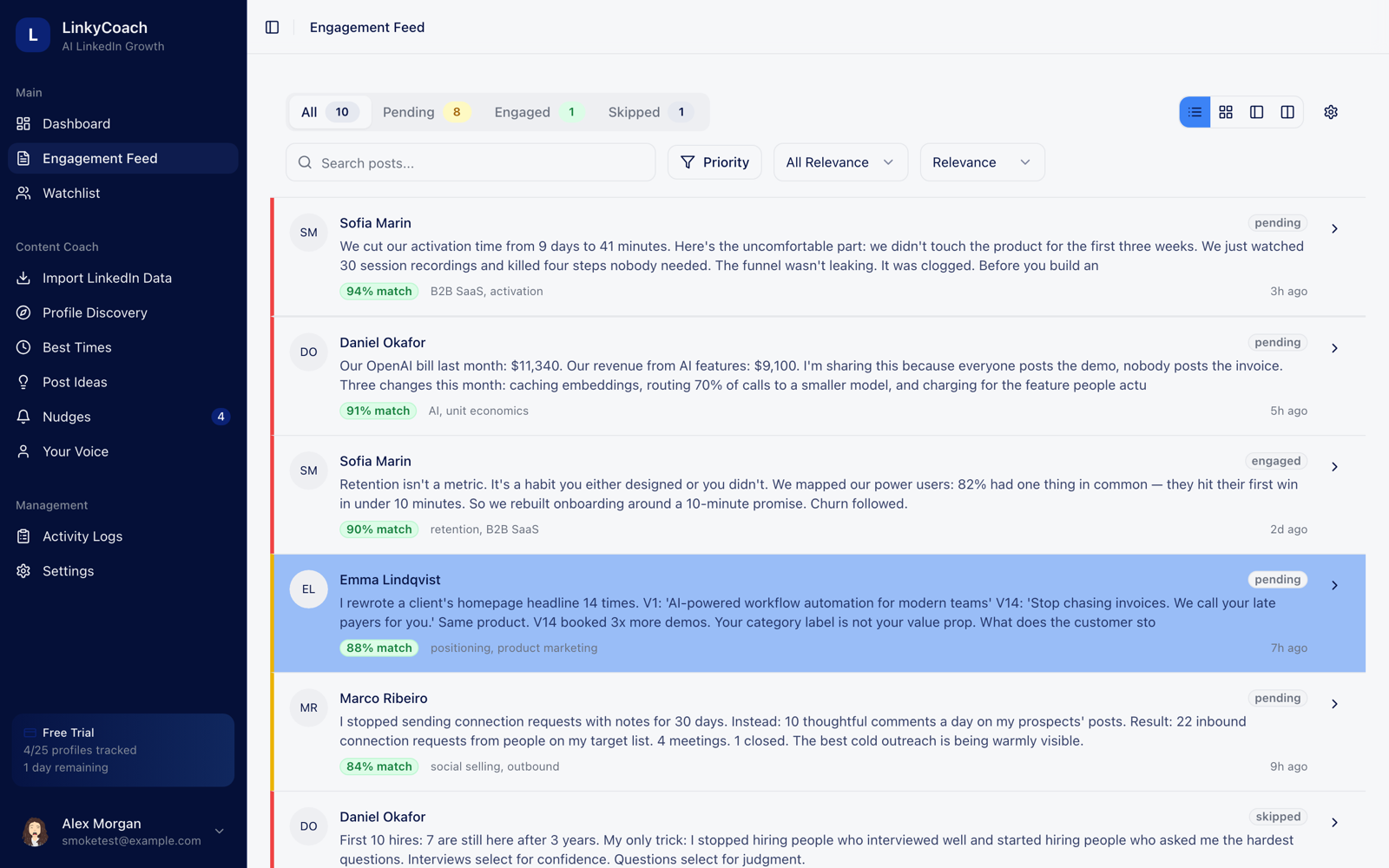
| Engagement as the main action | Secondary — growth automations (auto-DM, auto-plug) rather than a considered-commenting workflow | The whole product: tracked profiles' posts land in one queue, scored 0–100, worked like an inbox |
| AI comments in your voice | Voice modeling is built for writing your own posts, not for replying on others' | Three comment drafts per post — thoughtful, questioning, personal — from a voice profile learned from your real posts |
| Habit & coaching layer | None — it's a production tool | Nudges, streak milestones (3/7/14/30/60/100 days), and a weekly engagement goal |
| Account safety approach | Scheduling uses official APIs; the auto-DM / auto-plug growth features are the ones to use carefully | No LinkedIn password, no cookie extension, never auto-posts. AI drafts; you review, edit, and post |
| Platforms | X (Twitter), LinkedIn, Instagram Threads | LinkedIn only, single-seat, by design |
| Pricing | ~$29–$37/mo to start, up to ~$97–$197/mo for unlimited + automations (as of Aug 2026; free trial) | Free to start — no card, 3 days of full access; then Basic $29/mo, Pro $59/mo or Business $99/mo |
Where LinkyCoach fits
LinkyCoach is engagement-first and LinkedIn-only. The loop is deliberately narrow: track the profiles that matter → their posts land in a feed scored 0–100 for relevance → each post comes with three comment drafts written from a voice profile learned from your actual posts → nudges and streaks keep the habit alive → timing recommendations come from your own posting history, not a generic best-time-to-post chart.
Where Postwise helps you publish more, LinkyCoach helps you get seen by the right people — by consistently, thoughtfully showing up in their comments. And safety is the headline, not a footnote: LinkyCoach never asks for your LinkedIn password, doesn't use a cookie-based extension, and never posts or comments on your behalf. Every AI draft waits for you to review, edit, and post it yourself.
Who should NOT pick LinkyCoach
Honesty over conversion. If any of these describe you, Postwise (or something like it) is the better buy:
- Your main need is AI-written posts and threads. If the job is "generate content for me," Postwise's GhostWriter is purpose-built for it. LinkyCoach drafts posts too, but engagement is the point here — not volume publishing.
- You want a scheduler. LinkyCoach has no scheduler and never auto-posts. If batch-queuing weeks of content is the whole reason you're shopping, Postwise wins outright.
- You publish across X and Threads, not just LinkedIn. LinkyCoach is LinkedIn-only. Postwise is multi-platform.
- You want growth automations. Auto-DM, auto-plug, evergreen retweets — we deliberately don't do hands-off outreach. If that's the growth model you want, we're not it.
- You need team seats. LinkyCoach is a single-seat product today.
If engagement is the part you keep skipping, start here
LinkyCoach is free to start — no card required. Every account gets 3 days of full access, then it's Basic at $29/mo, Pro at $59/mo or Business at $99/mo ($290, $590 or $990/yr — two months free). Cancel anytime.
Start free — no card requiredNo LinkedIn password required. Ever.
Comparing other tools? See the Taplio alternative and the Aware alternative comparisons.